
October 27, 2026
You're a product manager with a pile of customer requests. Some seem to describe the same problem. One comes from a large customer asking for a feature nobody else has mentioned. Where do you start?
Or you're a founder looking at a new market. You have a few possible ways in, and each one rests on different assumptions about the buyer and what your team can deliver.
Maybe your creative team is developing a campaign concept. A workshop has just left the board full of promising ideas, half-finished concepts, and sticky notes that say almost the same thing in different words. Which ones are worth presenting?
All three are brainstorming, but not in the same way. AI can give them all more ideas. But a brainstorm doesn't end when the list gets longer. You still have to develop and challenge ideas, see how they connect, test them against what you know, and decide what deserves more work.
The best tool depends on what you need to do with the ideas next.
Most brainstorms involve five activities:
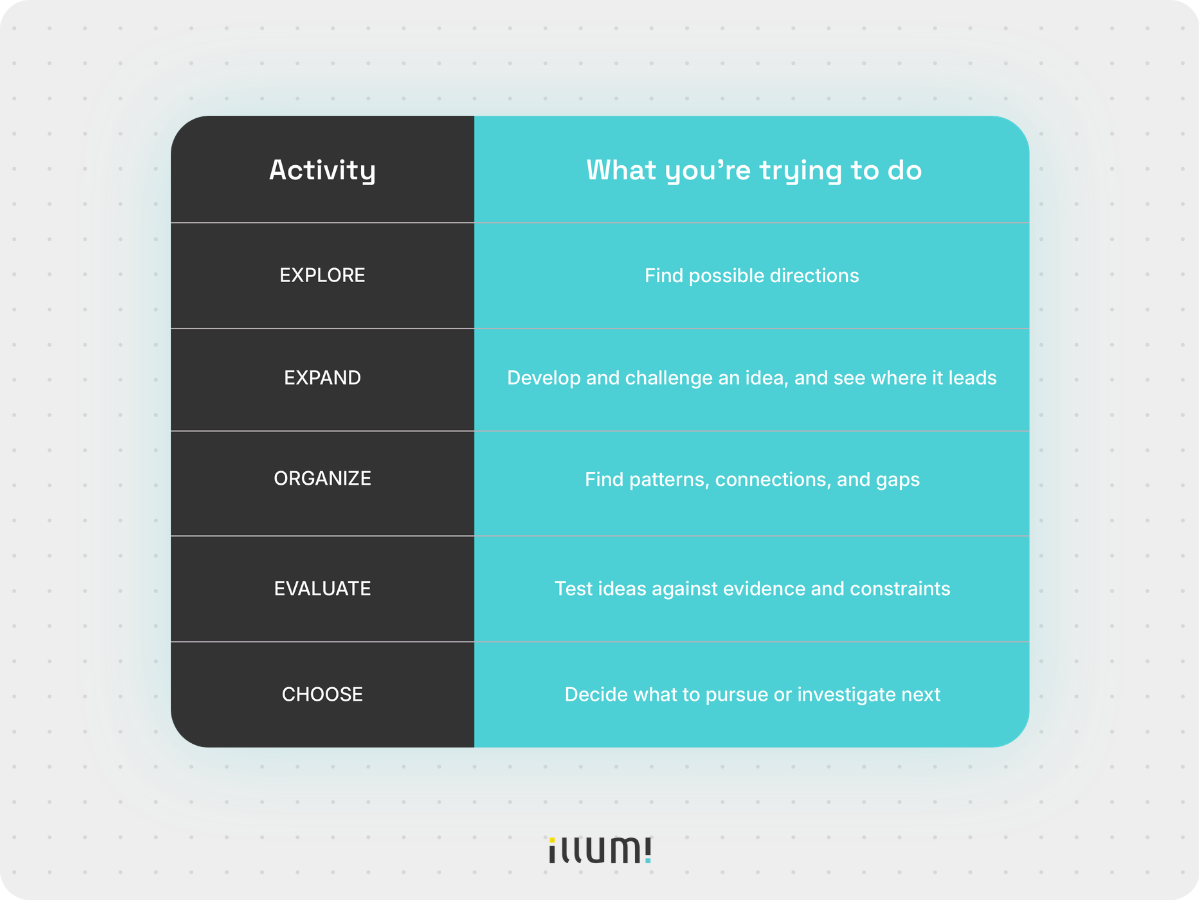
You won't always do them in that order. A customer interview can change the question halfway through. A strong campaign idea can send the team back to explore other approaches.
That's why generating ideas is only part of the job. Before you compare AI tools, look at where your brainstorm is getting stuck.
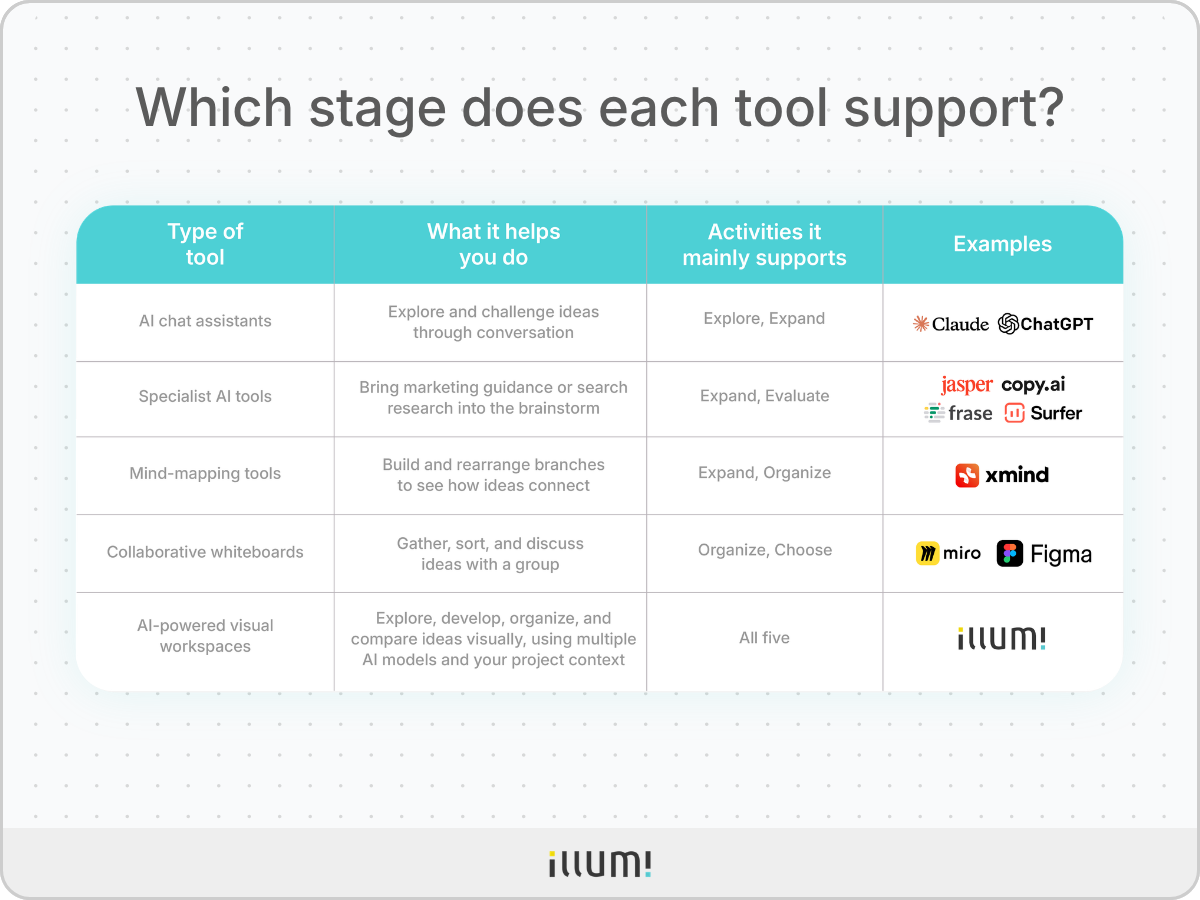
Each type of tool gives you a different place to work through an idea. Their features overlap, but what they make easy is different. The third column shows which of the five activities each type mainly supports.
Project context is the material your ideas depend on: research, notes, constraints, and earlier decisions.
You can organize ideas in ChatGPT or ask Miro to suggest new ones. The categories aren't rules about what a tool can do. They show what each tool makes easiest.
Let's go back to the product manager, the founder, and the creative team to see where each type of tool helps.

The founder has two possible routes into the new market but isn't sure which assumptions to test first.
In ChatGPT or Claude, you can describe the buyers you know, the problem your product solves, and the routes you're considering. Ask for a route you haven't thought of. Then push on one suggestion: What would need to be true for this to work? What would a buyer object to? Which assumption has the least evidence behind it?
The value is in the back-and-forth. Each question builds on the last answer, and a vague route becomes specific enough to check.
Both tools offer Projects where you can keep related files and instructions. For talking an idea through, they do the same job, so use whichever you already have. If you want a second opinion on a route, run the same question through the other tool.
The catch is length. Once each route grows into its own long thread, comparing the assumptions behind them means scrolling back and forth. Keep your source material handy so you can check what the conversation is building on.
Specialist tools bring one kind of expertise into the brainstorm. Jasper and Copy.ai bring your marketing guidance. Surfer SEO and Frase bring search research. Compare the tools within each pair, not across the two pairs.
The creative team has several campaign concepts. A clever line isn't enough. The idea has to fit the product, the audience, and the brand.
Jasper lets a team apply brand, audience, and product guidance through Jasper IQ while developing different directions. Copy.ai draws on stored company and product information, and its workflows can turn an idea into repeatable marketing work. Jasper suits teams that mainly need on-brand ideas. Copy.ai suits teams that want the idea to feed straight into a workflow they already run.
For example, the team could take three rough concepts and ask how each would speak to one buyer without drifting from the product's approved claims. That can show which concept has room to grow and which only works as a headline.
Brand guidance shapes an idea. Whether customers actually have the problem a concept describes is a question for your interviews and sales calls.
One campaign concept includes an article arguing that onboarding checklists don't work. Customers keep raising onboarding problems, and the team wants the article to bring in search traffic too.
Surfer SEO shows related topics and keyword clusters, so it suits planning what an article should cover. Frase surfaces the questions people ask and the gaps in pages already ranking, so it suits finding what readers still need answered.
That research can change the plan. Say the questions show that readers first need help working out why their onboarding breaks down. The article can start there before making the contrarian case.
Search data shows how people look for help. It can't tell you whether the contrarian claim is true. That's for your interviews and editorial judgment to decide.
The product manager has requests for a dashboard, an alert, and a new setup flow. At first, they look like three feature ideas. Look closer, and all three point to friction during integration.
In Xmind, put "integration friction" at the center of a mind map. Branch out into customer requests, possible causes, solutions, technical constraints, and open questions. Xmind AI can build an editable map from a prompt or source material, then help you expand and rearrange it.
Now the manager can see that two requests address the same problem, while a third rests on one customer's claim. The gaps show up too. Nobody has checked whether customers want an alert or whether setup itself is failing.
Just remember that every branch looks equally solid on a map. Go back to the original feedback before deciding which ones to pursue.

Back to the campaign workshop. The creative team has dozens of sticky notes. Some repeat the same thought. Others only make sense next to someone else's.
Miro and FigJam both give the team a shared board to group those notes, talk through the themes, and vote on which concepts deserve another look. Both use AI to help sort sticky notes.
The difference is in the details. Miro can also cluster notes by keyword or sentiment and turn a photo of paper sticky notes into editable ones, which helps when the workshop happens in a room. FigJam can set up a board for an exercise from a prompt, and it sits next to your Figma design work, which helps when designers are in the session. If your team already runs workshops in one of them, stay there.
A vote shows which concepts people like. Whether the favorite fits the brief and the budget is the next thing to check.
Collaborative whiteboards like Miro and FigJam help teams brainstorm, organize ideas, and work together visually, with AI features increasingly supporting those activities.
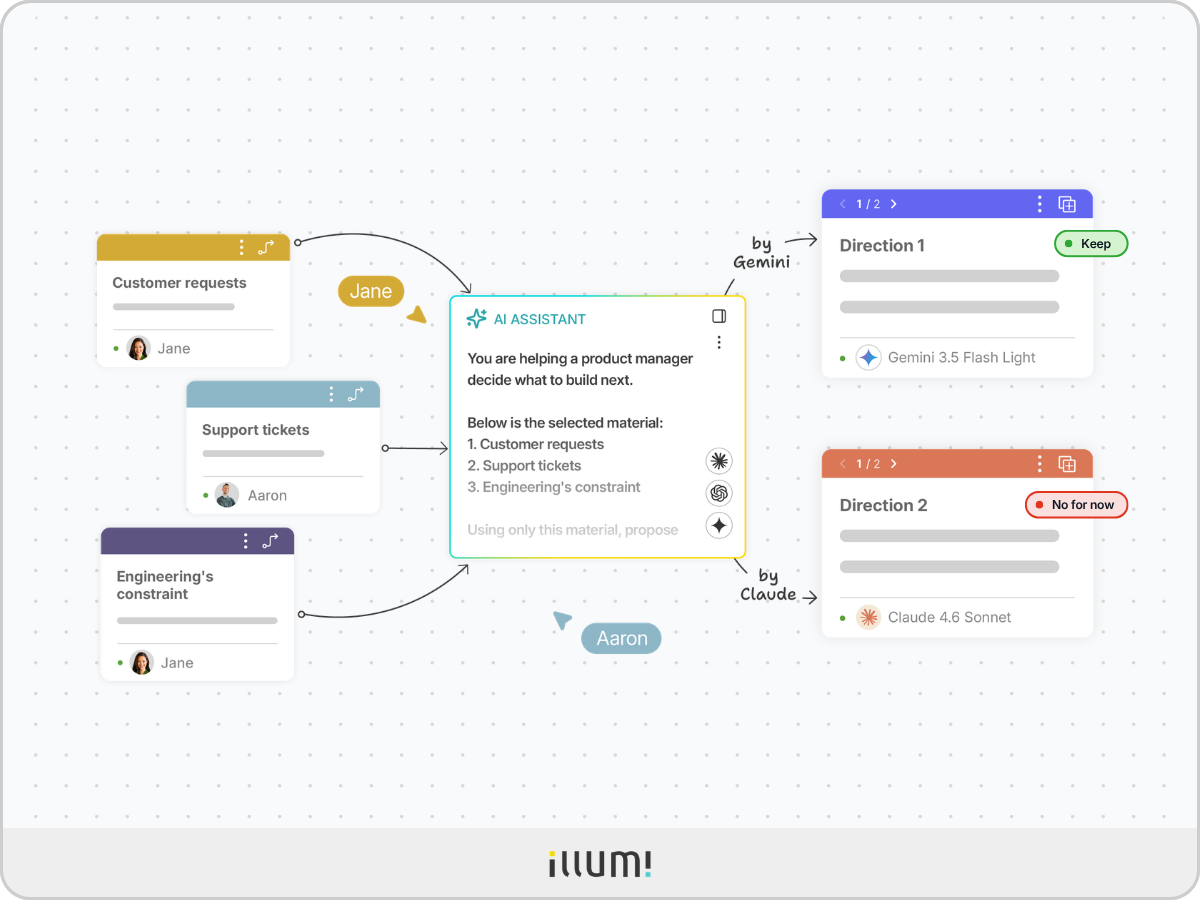
illumi approaches brainstorming as an AI-powered visual workspace, where you can work with multiple AI models directly alongside your ideas, research, and project context. This allows you to explore different directions, compare model outputs, and develop ideas without constantly moving between separate AI conversations and your whiteboard.
Take the founder again. Their routes into the new market now sit on one board, next to the buyer notes, customer evidence, and what the team can deliver.
The founder selects the material relevant to one route and asks different AI models, like ChatGPT, Claude, and Gemini, to develop or challenge it. Each model receives the same selected material, so the founder can compare their answers side by side.
Add a new buyer finding, challenge the revised route, and see what changed. The earlier notes and AI responses remain beside the new work, so the founder can see why the route changed.
Let's follow the product manager through all five activities.
The manager has customer requests, support tickets, and several suggestions from the team. They need to work out which customer problem deserves attention and what they could do about it.
The brainstorm ends with a next step for each direction and a reason for it. Because the material and responses stay on the board, the team can see how those decisions were made instead of piecing them together from separate chats.
Start where your brainstorm slows down.
You may use more than one tool as the work develops. Bring a real question and the material behind it to the tools you're considering and see which one helps you work through it.
The best brainstorming tool isn't necessarily the one that generates the most ideas. It's the one that helps you move from a rough possibility to a direction you can explain, challenge, and confidently pursue.
illumi Inc. © 2026
