
September 23, 2026
.png)
Maya is a product manager (PM) on a B2B SaaS product. She's trying to understand why new customers leave before they finish setup.
She has 42 support tickets, multiple customer calls, a dashboard full of drop-off data, three possible explanations, and a sales team asking what she is going to do about it.
Today, she needs to find the pattern in those calls and tickets. Tomorrow, she might need to compare whether the problem is onboarding, missing integration requirements, or confusing pricing.
Once the team chooses a direction, she'll need to turn it into requirements, get it onto a roadmap, test it, and eventually work out whether customers actually stay.
Different tools help at different points. That's the problem with asking, "What's the best AI tool for product managers?" because product management isn't one job.
This guide compares AI tools by the part of the product workflow they're actually useful for, and what each one still needs the PM to decide.
Maya's team has noticed a worrying pattern: customers who signed up in the last two months are dropping off before they connect their first data source. The CEO wants an answer before the next planning meeting.
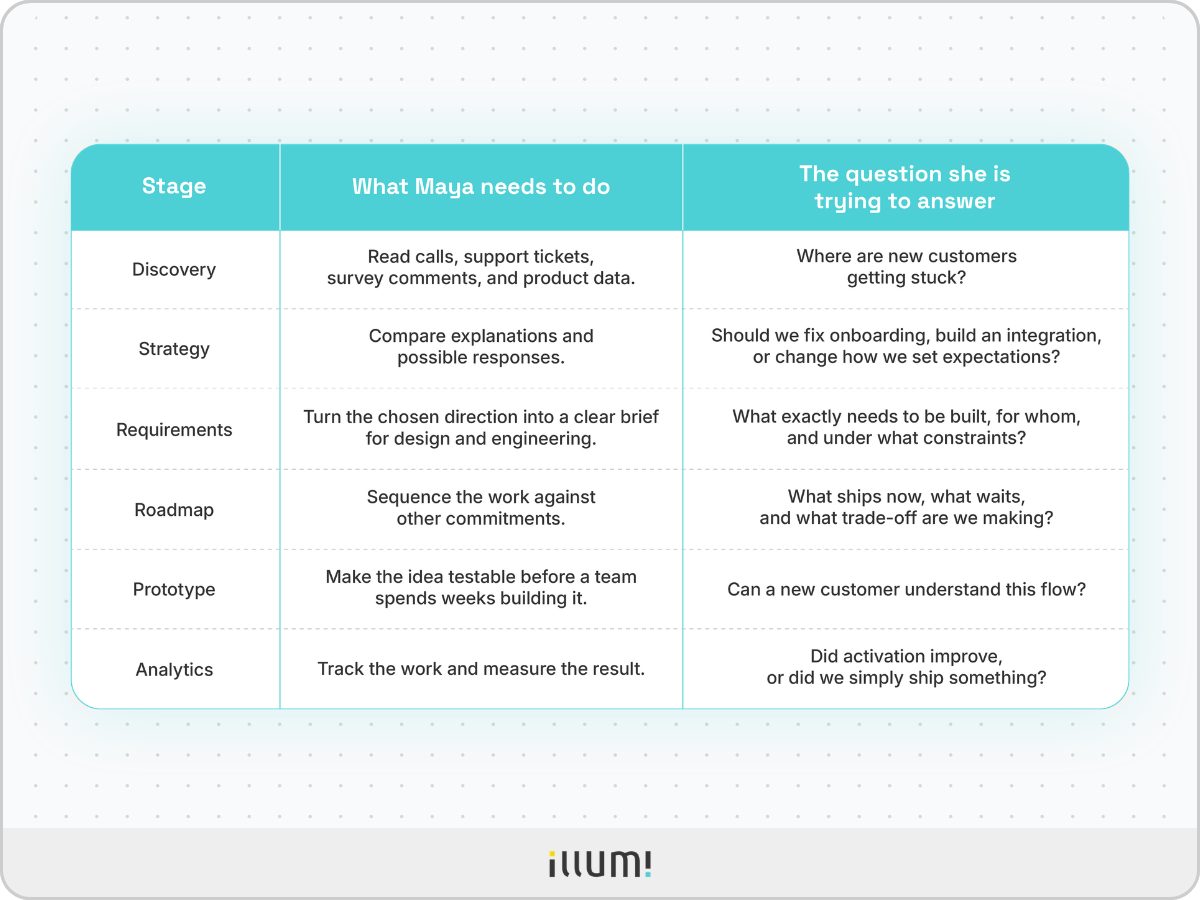
Each stage asks a different question and produces a different kind of work. That's why the AI tool that is useful at one stage may not be the right tool for the next.
Before comparing tools, find the bottleneck. It could be the task that repeatedly slows a decision down, makes the team redo work, or leaves important information trapped in someone's head.
A quick way to spot it:
Once you've found that bottleneck, ask:
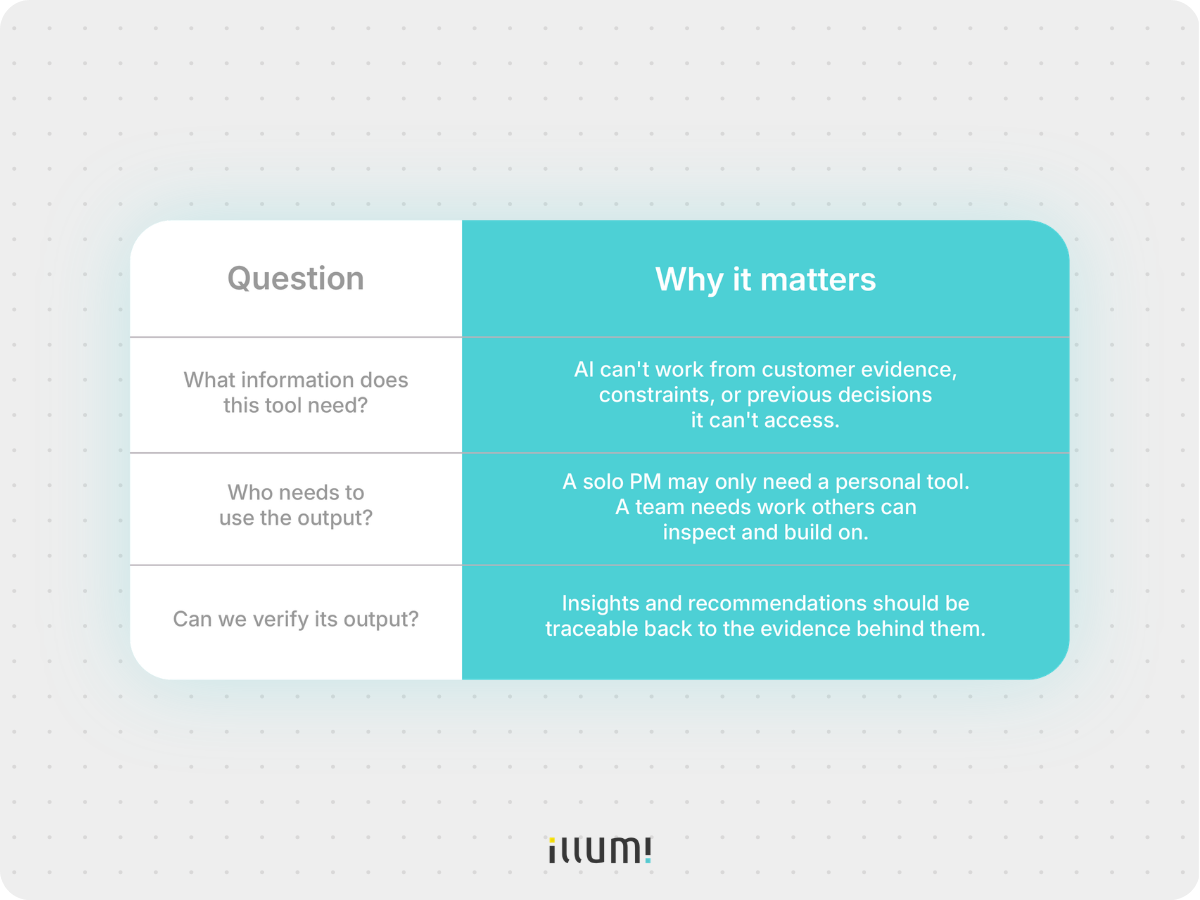
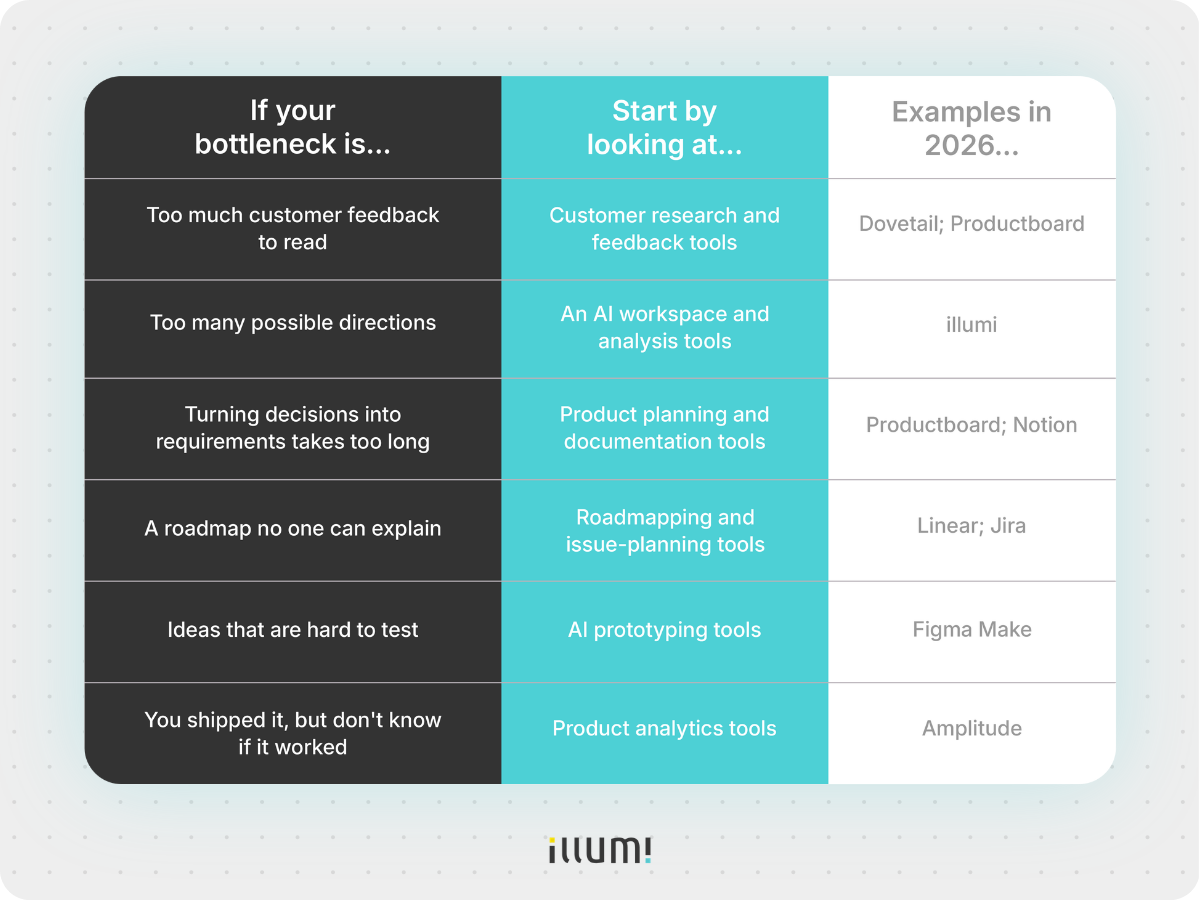
You've identified where the workflow is breaking. Here's the short version of which category of tool to look at.
Maya begins with onboarding calls, support tickets, survey responses, and product data around setup. But she still doesn’t know why customers are dropping off. Her first job is to find the patterns buried across all that evidence.
This is where customer research tools earn their keep. Dovetail can organize calls, documents, and surveys into a research project, generate summaries, and help teams search for repeated themes. Productboard can also collect feedback alongside prioritization work. Both are useful when the team's problem isn't a lack of customer feedback. It's the amount of it.
What AI can do: Group repeated complaints, summarize calls, surface supporting quotes, and show where the same friction keeps appearing.
What Maya still has to do: Decide what those patterns actually mean. "Setup difficulty" might describe confusion, a technical blocker, or mismatched expectations. Each points to a very different product problem.
Best fit: Use a customer research tool when the bottleneck is making sense of a large volume of customer evidence.
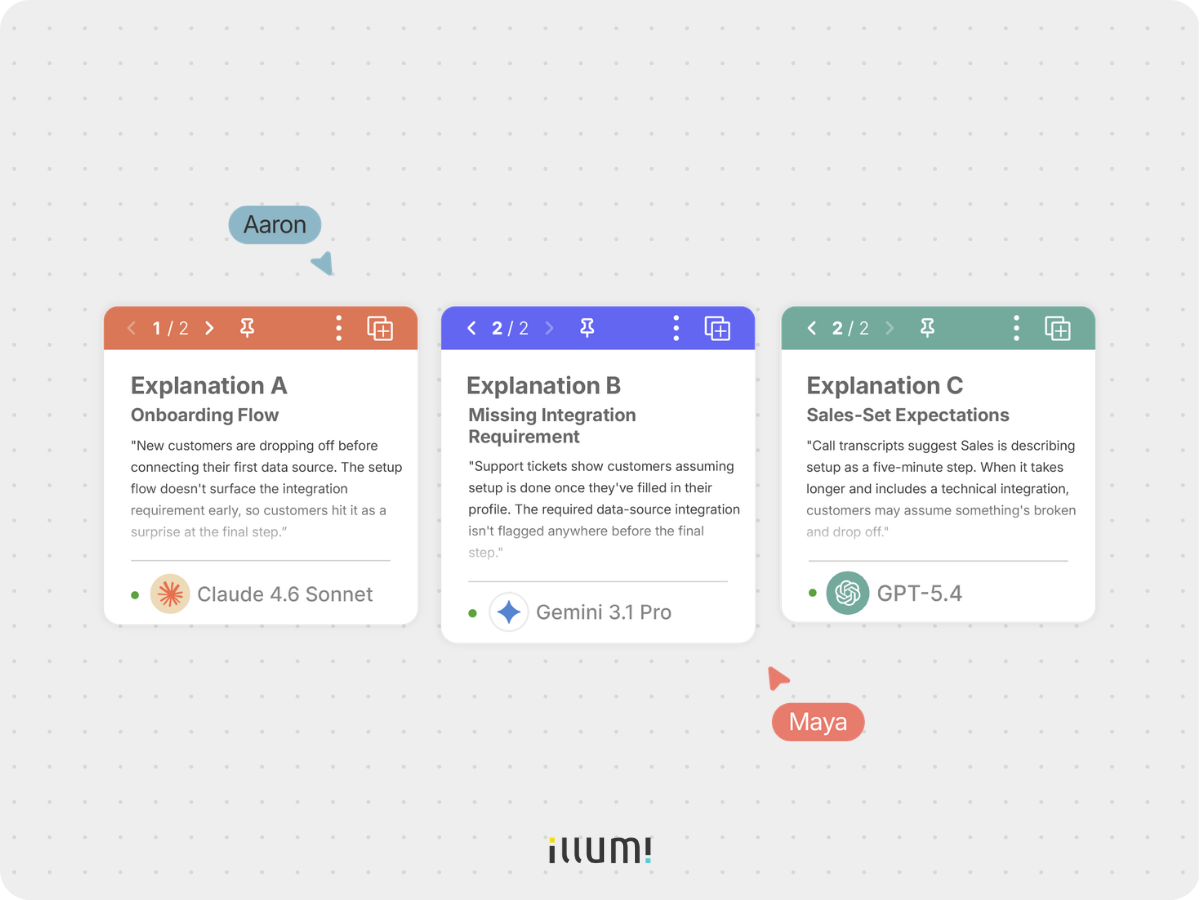
By Wednesday, Maya has three plausible explanations. The problem could be the onboarding flow, a missing integration requirement, or expectations set by Sales.
This is no longer a summarization problem. It's a comparison problem.
Maya needs to test each explanation against the same evidence before deciding what to do.
She might ask AI to build the strongest case for fixing onboarding, then do the same for the missing integration and the sales-expectation problem. She can even ask different AI models to critique each option and compare their answers side by side.
The important part is that every comparison starts from the same customer feedback, product data, and constraints.
This is where an AI workspace becomes useful. In illumi, Maya can keep the evidence in one place while exploring different directions with ChatGPT, Claude or Gemini, then compare their outputs side by side.
Without the same project context, Maya can end up comparing one answer from ChatGPT that saw the support tickets with another answer from Claude that only saw the brief. If so, she's not really comparing AI models. She's comparing two different versions of the project.
What AI can do: Explore different explanations, challenge assumptions, and help compare the options.
What Maya still has to do: Decide which direction is worth pursuing and which trade-offs the team is willing to make.
Best fit: Use an AI workspace when the hard part is deciding between several well-supported options, especially when more than one person needs to understand why the team chose one direction.
Maya chooses a direction: the first-run onboarding flow needs to make the integration requirement visible before customers reach the final setup step.
Now Maya needs to turn that decision into something design and engineering can actually build. What exactly needs to change in the onboarding flow? Which customers does it affect? When should the integration requirement appear? What technical constraints does engineering need her to account for? And how will the team know whether the change worked?
What AI can do: Help turn the agreed direction into draft requirements.
What Maya still has to do: Check that the requirements reflect the decision the team actually made.
Best fit: Use Productboard when the team needs to compare this work against customer evidence and other priorities. Use Notion when the team already works from shared docs.
The requirements brief answers what needs to be built. The roadmap answers when the team should build it.
Once the requirements brief exists, it still has to compete for a place on the roadmap against everything else the team has already committed to.
What AI can do: Help Maya make sense of what's already in the backlog by summarizing existing work, surfacing related requests, and flagging possible duplicates before she decides where the new work belongs.
What Maya still has to do: Decide what this work should come before, what it can wait behind, and which trade-off the team is willing to make.
Best fit: Both tools use AI to reduce admin around backlog and issue management. Pick Linear if your team wants a fast, focused tracker for day-to-day product and engineering work. Pick Jira if work crosses teams and needs configurable workflows, dependencies, and tighter controls.
Maya doesn't need a fully built integration flow to learn whether customers understand the new onboarding step. She needs something customers can click through and react to.
Figma Make helps teams turn a prompt, an existing design, or a set of components into a functional prototype. Instead of describing the new onboarding step in a document, Maya can show a customer what it might look like, ask them to complete the flow, and see where they hesitate.
That matters because it changes the conversation from "we think this will be clearer" to "watch three new customers try this version."
What AI can do: Help Maya get from an idea to something customers can actually try, without waiting for the team to build the real thing.
What Maya still has to do: Put it in front of real customers and interpret what she sees. AI can build the prototype, but it can't replace the customer test.
Best fit: Use an AI prototyping tool when you need to test whether customers understand a flow before the team builds the real thing.
The onboarding change ships. Maya now needs to know whether more customers connect their first data source - not whether the team completed the ticket.
Amplitude helps teams examine product events, session replays, cohorts, experiments, and feedback in one analytics platform. That makes it a realistic starting point once you're already tracking the events that matter.
What AI can do: Help Maya explore the data, spot patterns, and investigate where customers are still dropping off.
What Maya still has to do: Decide what the results actually mean. If activation improves after the change, she still needs to work out whether the new onboarding flow caused it or something else did.
Best fit: Use analytics AI after you have decided what behavior matters and are tracking it in the product.
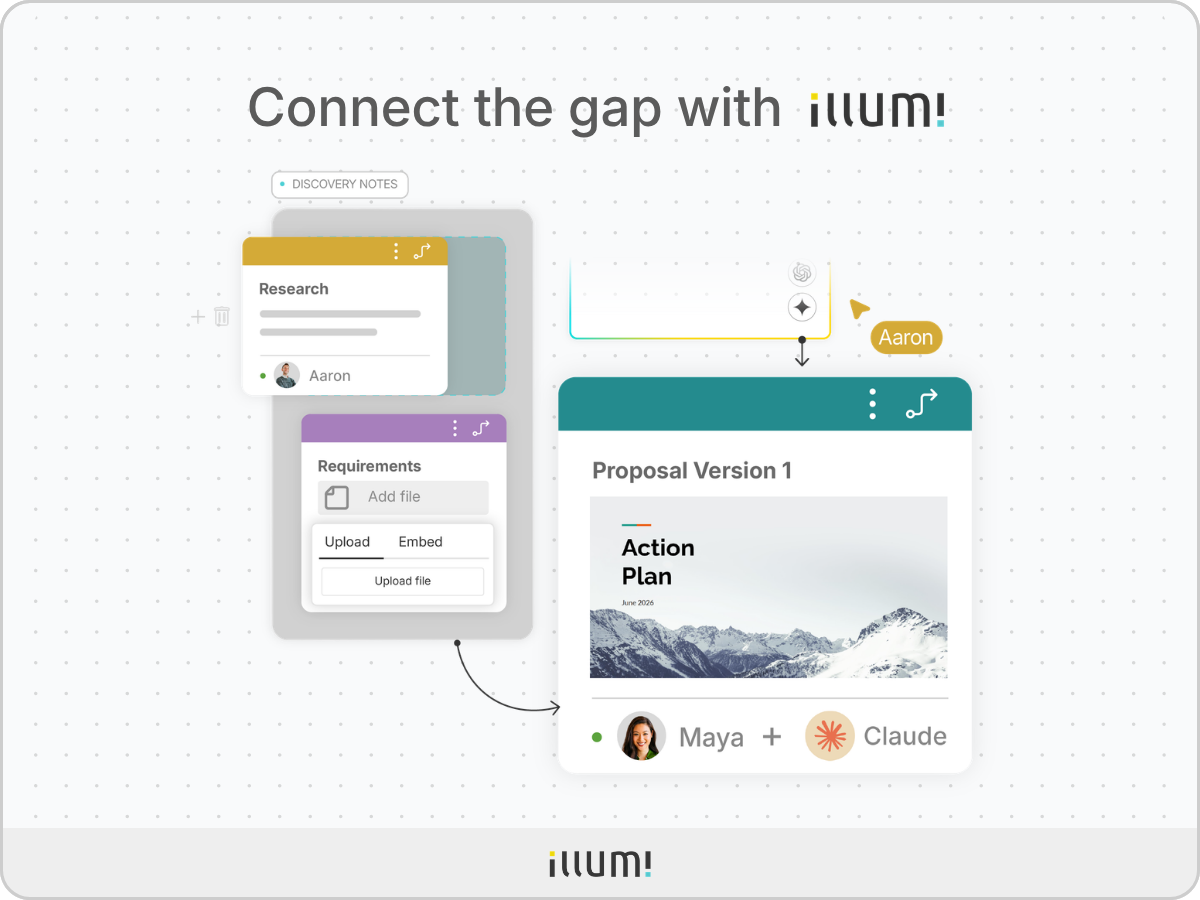
illumi is most useful in the gap between gathering information and committing the team to a direction.
Research tools help you find patterns in customer evidence. Planning tools help turn a decision into work. illumi sits between the two: helping your team bring the evidence together, explore different explanations, and compare possible directions before deciding what to do.
Because the evidence, AI outputs, and decisions stay in the same AI workspace, your team can see why a direction was chosen instead of inheriting only the final answer.
Once the direction is clear, the work can move into requirements, roadmapping, prototyping, delivery, and measurement.
There's no single best AI tool for product managers because product management isn't one job.
Maya needed different kinds of help as the work moved from customer feedback to a decision, from that decision to something the team could build, and from something shipped to a result she could measure.
As you add tools, pay attention to what happens between those stages too. Making one task faster doesn't help much if your team has to reconstruct the evidence, decisions, and reasoning every time the work moves forward.
Start with the bottleneck. Choose the tool for that job. And make sure the work you've already done doesn't disappear when you move to the next one.
illumi Inc. © 2026
