
November 16, 2026
Your customer success team is trying to understand why customers leave during their first month.
You have exit interviews, support tickets, onboarding notes, and an account activity report showing which accounts completed setup, invited teammates, and returned to the product.
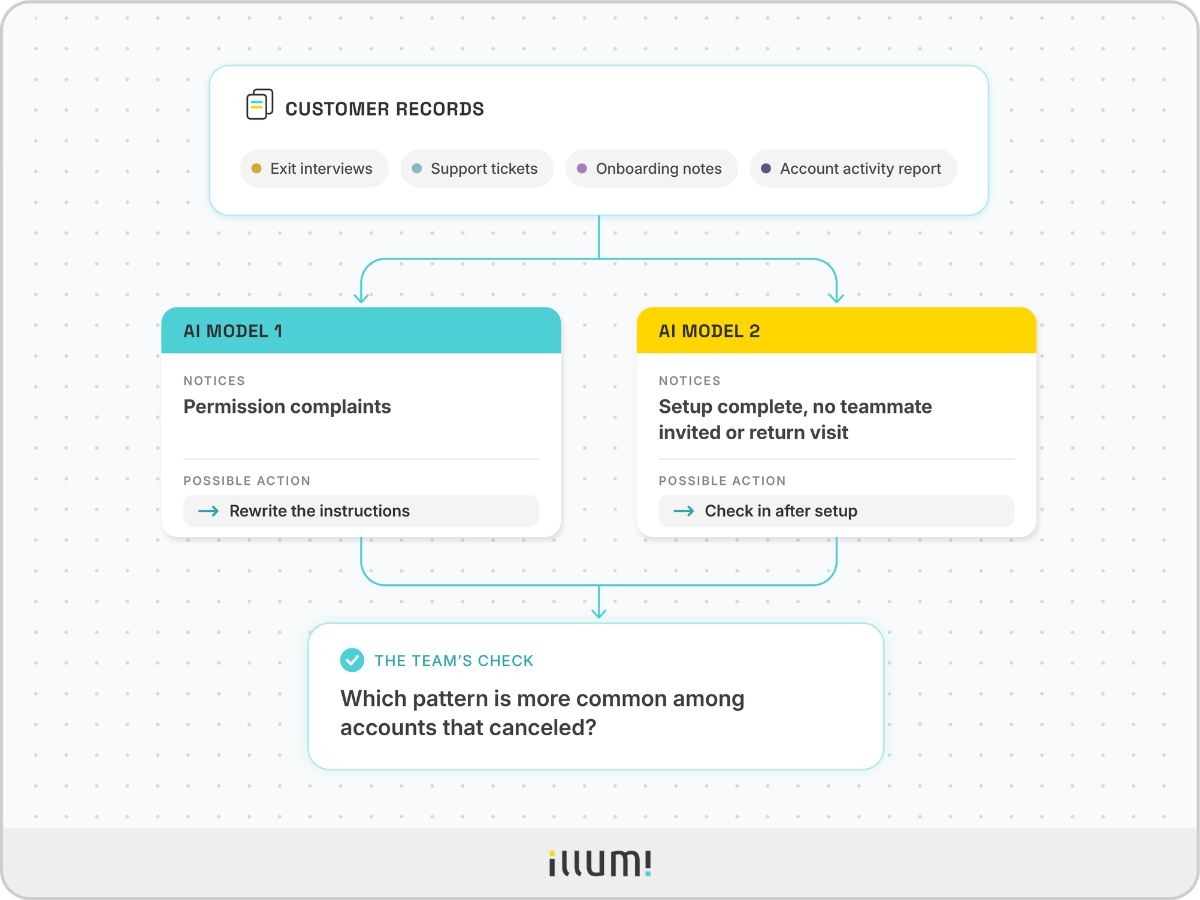
Feed all of that to an AI model, and it notices repeated complaints about account permissions and recommends rewriting the permissions instructions.
That sounds reasonable, right? Several customers did struggle with permissions.
Then you give another model the same material and question. But this one notices something else: some customers completed setup but never invited a teammate or returned to the product.
Now the team has two leads to check. Should it rewrite the permissions instructions? Add a check-in after setup? Or both?
Getting two answers is easy. Checking how each pattern relates to the canceled accounts, and deciding what to test first, takes more work.
That's where a multi-model AI platform becomes useful.
A multi-model AI platform gives you access to several AI models in one place. You can pick the model that suits each task, switch between them without changing tools, or ask more than one the same question and compare their answers.
But for project work like the customer success team's, the platform should do more than that. Look for one that lets the AI models use the same selected material and shows their responses beside that material, so you can check each answer before deciding what to do.
AI models don't all handle the same task in the same way. Here's what your team can do when it has more than one to choose from:
The customer success example shows what another perspective adds: a second lead for the team to check.
The first model focuses on permission complaints. The second notices that some customers completed setup but never invited a teammate or returned to the product.
Neither response settles the issue. The models have pointed the team toward two patterns in the customer records that need a closer look.
So the team goes back to the records.
Suppose the team finds that most canceled accounts completed setup, and a few of those accounts reported permission problems. Many never invited a teammate or returned after setup. The team decides to test a check-in with customers who finish setup but haven't invited a teammate.
The second model didn't make that decision. It surfaced a question the first answer hadn't settled, and the team checked it.
That's a useful reason to bring another model into a project: you have an answer that matters, and you want to see what it missed before acting on it.
For this comparison, the project context is the customer records selected for the question. Both models receive those records and the same question, so the team can compare what each noticed.
If the first model reads the support tickets and the second only sees the account activity report, you can't tell whether the difference in their answers comes from the models or from the records each one received.
Running the comparison manually means opening one AI tool, pasting in the background, asking your question, and repeating the process in another. As the project changes, you have to keep track of what you gave each model.
Say the first prompt includes last week's exit interviews. The second includes a newer activity report. One mentions the permission complaints; the other doesn't. By the time both answers are in a document, someone has to go back through the chats to work out which records each model saw.
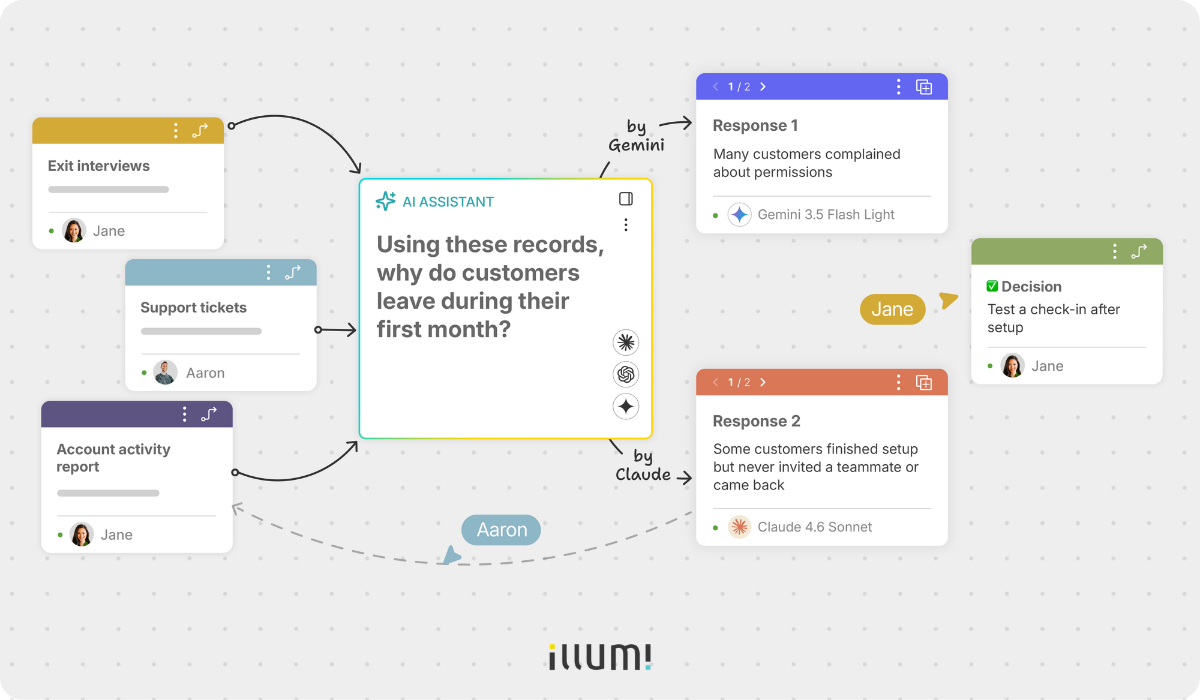
With shared context in a multi-model AI platform, the team selects the interviews, tickets, and report relevant to the question, then runs both models from those same records.
The team compares where the responses agree and differ, then opens the records behind each claim. After a new interview arrives, it reruns the question and checks what changed.
Having access to multiple AI models is useful. Getting them to work from the same project context is what makes their responses easier to compare.
You don't need several models for every task.
If your customer success team has already agreed on what the records show and needs a first draft of an internal update, one AI model is enough. The team reviews the draft against its finding and sends it on.
You can use a second model when your team is still choosing between possible causes, testing an interpretation of mixed evidence, or checking a recommendation before acting on it.
Each extra response takes time to read and evaluate. Run another model when you know what you want to learn from the comparison.
Try the platform with a question your team is already working on, using the interviews and reports you would normally check.
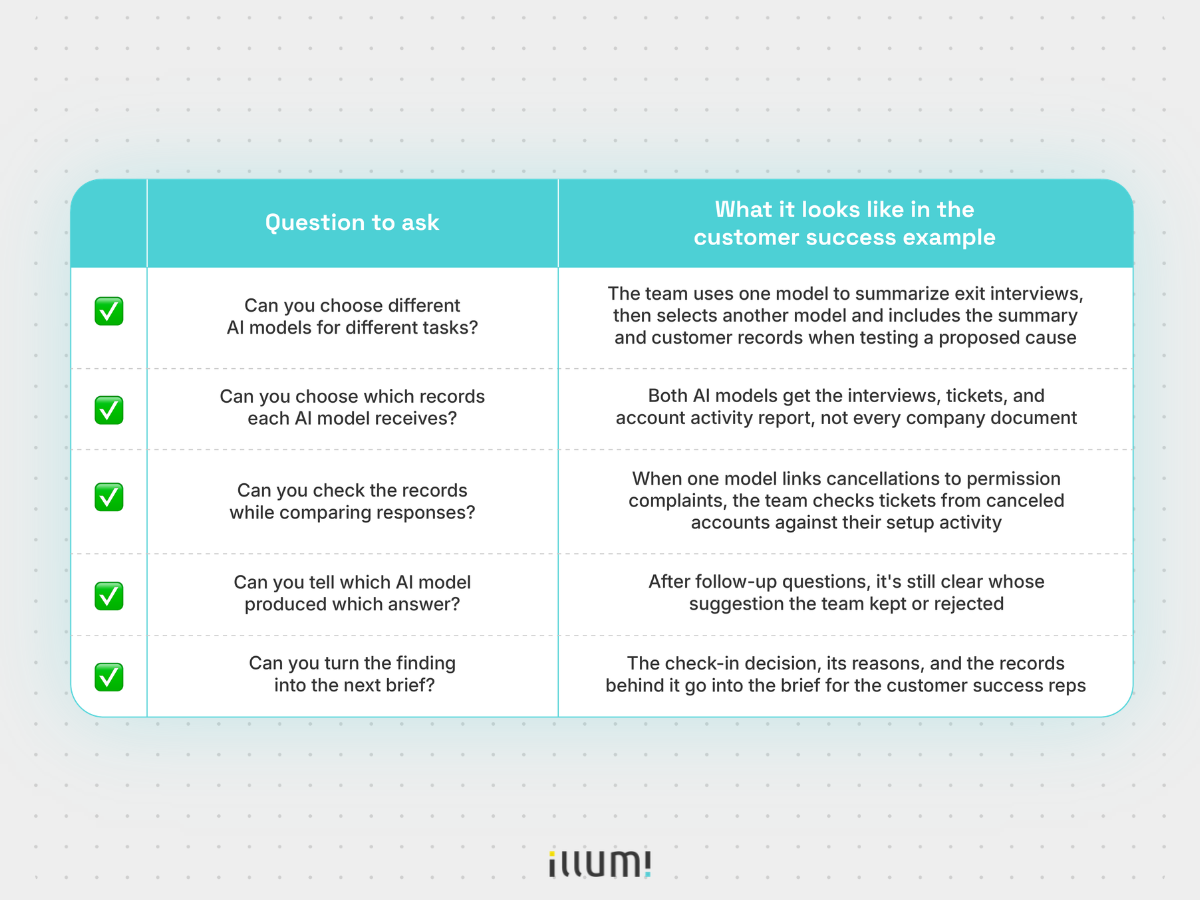
Those questions tell you more than the number of models on offer. They show whether the platform supports the work your team has to do with the answers.
Here's how those questions play out in illumi.
illumi is an AI-powered visual workspace with access to 30+ AI models, like GPT, Claude, and Gemini. You work with the models available to you alongside your research, notes, and project context, instead of moving between separate AI tools and documents.
When you want to compare responses, you give each AI model the same selected material and question. You can also match the AI model to the task: use one to summarize research, another to develop an idea, and a third to challenge it, all on the same board.
Their responses sit side by side, next to the material they came from, so you can see which AI model said what and check each claim against the source.
When you settle on a direction, it stays on the board beside the evidence that led to it, ready for the next brief or task.
A multi-model AI platform earns its place when you need different AI models for different tasks, a second answer before an important decision, or a clear record of how your team reached it.
The value of such a platform isn't simply having more models to choose from. It's being able to use the right models for the work, compare their outputs when it matters, and carry what you've learned into the next decision.
illumi Inc. © 2026
